
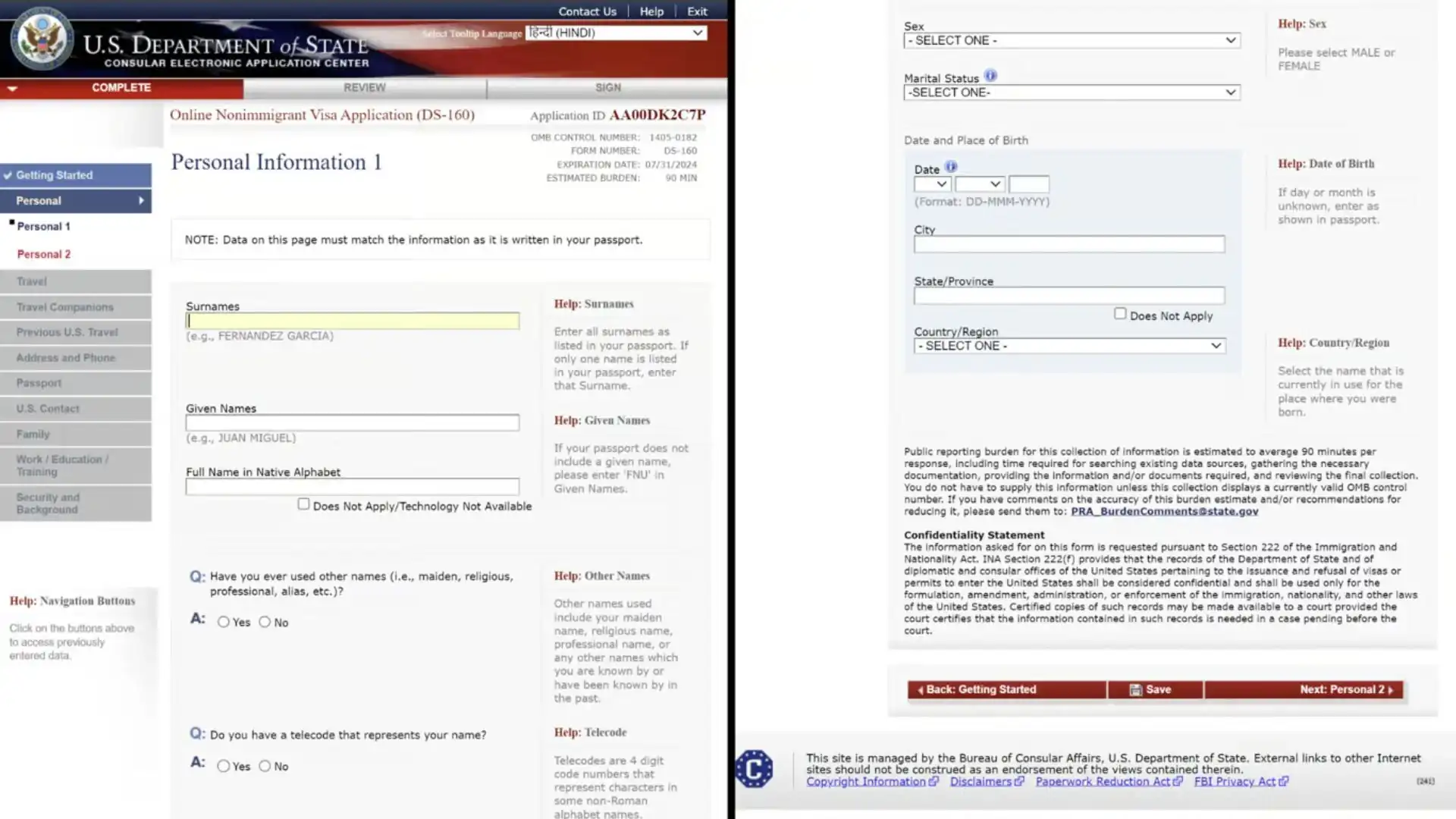
Filling the DS-160 form correctly is one of the most critical steps when applying for a US visa from Dubai or Abu Dhabi. Even small mistakes can lead to delays, interview issues, or visa refusal.
This guide is specially written for UAE residents (Indian, Pakistani, Filipino, Bangladeshi, and other nationalities) to help you complete the DS-160 form accurately and confidently.
🇺🇸 What Is the DS-160 Form?
The DS-160 is the official Online Non-Immigrant Visa Application Form required for all temporary US visas, including:
B1/B2 (Tourist & Business)
F1 (Student)
Other short-term non-immigrant visas
📌 The information you provide in the DS-160 is directly used by the visa officer during your us interview.
🖥️ Where to Fill the DS-160 Form?
The DS-160 form is completed online only on the official US visa application website.
You must:
Select your interview location (Dubai or Abu Dhabi)
Complete the form in English
Submit it before booking the visa appointment
📄 Documents You Need Before Filling DS-160
Keep these ready:
Passport (current + old, if any)
UAE residence visa
Emirates ID
Travel history details (last 5 years)
Employment / business details
Address & contact details
US travel plan (city, stay duration)
Digital US visa photo (as per specifications)
📝 Step-by-Step DS-160 Form Filling Guide (UAE Residents)
Step 1: Start a New Application
Choose Dubai or Abu Dhabi as location
Save your Application ID carefully
Set a security question
📌 You have 30 days to complete the form.
Step 2: Personal Information
Fill details exactly as per passport:
Full name
Date & place of birth
Nationality
Passport number
❗ Do not use nicknames or spelling variations.
Step 3: Travel Information
Mention:
Purpose of travel (Tourism / Business / Family visit)
Intended travel date (approximate is acceptable)
Length of stay
US address (hotel or relative)
📌 Avoid vague answers like “Not decided”.
Step 4: Contact & Address Details
Current UAE residential address
Phone number & email ID
Social media handles (mandatory field)
✔ Use active and correct contact details.
Step 5: Passport & Travel History
Previous US visas (if any)
Past international travel
Previous US refusals (answer honestly)
❌ Never hide refusals—this leads to automatic rejection.
Step 6: US Contact Person
If staying at a hotel:
Mention hotel name and address
If visiting family/friends:
Provide their name, address & relationship
Step 7: Family Information
Parents’ full names & dates of birth
Spouse details (if married)
Step 8: Work / Education Details
For UAE residents:
Employer name & address
Job title & salary
Joining date
For business owners:
Trade license details
Nature of business
Students:
University name
Course details
Sponsor information
Step 9: Security & Background Questions
Answer Yes/No carefully.
Most applicants answer No to all.
📌 Do not guess—ask an expert if unsure.
Step 10: Upload US Visa Photo
2×2 inches
White background
No glasses
Neutral expression
If upload fails, carry a printed photo to the interview.
Step 11: Review & Submit
Review every section carefully
Submit the form
Download & print the DS-160 Confirmation Page
✔ This page is mandatory for your visa interview.
❌ Common DS-160 Mistakes UAE Residents Must Avoid
Spelling errors in name or passport number
Wrong visa category selection
Inconsistent employment details
Incorrect travel purpose
Hiding previous refusals
Mismatch between DS-160 and interview answers
🔄 Can DS-160 Be Edited After Submission?
❌ No.
Once submitted, it cannot be edited.
✔ If there is a mistake:
Fill a new DS-160
Carry both confirmation pages to the interview
🤝 How Odit Travel Helps With DS-160 Form
We assist UAE residents with:
Accurate DS-160 form filling
Profile-based guidance
Error checking & review
Visa category selection
Interview readiness support
⚠️ We are an independent travel assistance provider. Final visa approval is decided solely by US authorities.
📞 Need Help Filling Your DS-160 From UAE?
Avoid costly mistakes. Get expert assistance.
📱 Call / WhatsApp: +971 54 478 5539
📧 Email: info@odittravels.com
👉 Get DS-160 Assistance Now

Comments (2)
Comments are closed.